

Touchscreen faults rarely announce themselves. A key on the on-screen keyboard misses more often than it should. A photo doesn’t swipe on the first try. The screen scrolls while your hands are on the desk.
What they share is that they’re hard to reproduce on demand. The device behaves in the shop and misbehaves at home. This check exists to turn a feeling into a coordinate.
Why a grid, and not tapping around
The touch test above divides the screen into a four-by-five grid (twenty regions) and asks you to fill every one. That produces a different result from tapping wherever you happen to look.
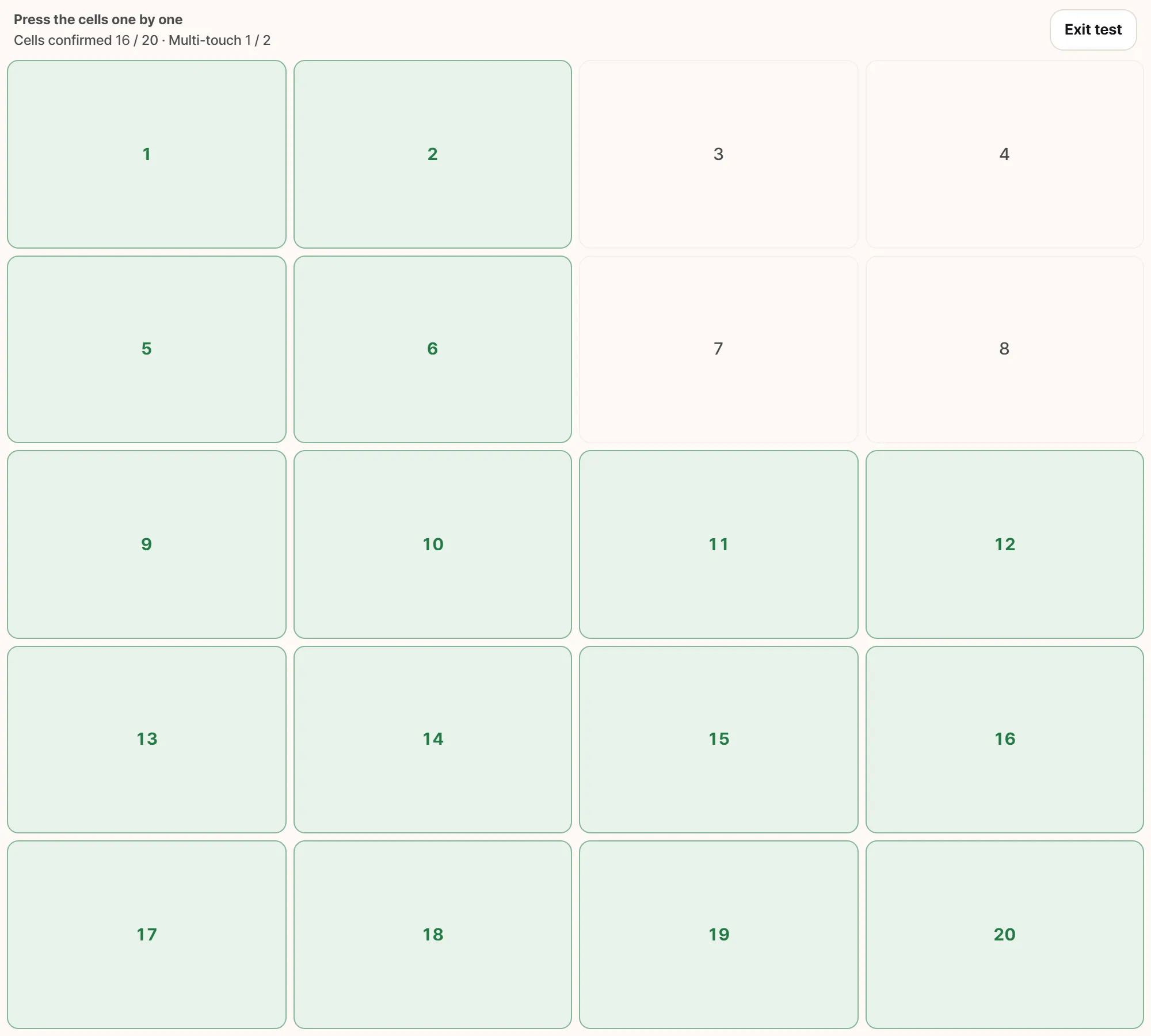
Unresponsive areas show up like this. What matters is not the count but the shape. A solid block in one corner, as above, points at the digitiser or connector serving that area. A few scattered cells is a different story.
A digitizer doesn’t fail all at once. It fails along a row, a column, or a corner, because the sensing traces run in those directions. Break one and you lose everything that depends on it, in a shape.
The trouble is that people touch a screen in a very small number of places. The middle, and the lower third. A dead patch in the top corner can survive weeks of ordinary use unnoticed. Twenty forced targets exist to make you touch the places you never touch.
Tap each cell rather than dragging across them. A dragged finger won’t fill the cells it passes over, and that isn’t a fault. The browser gives the first element you touched an implicit hold on that finger, so the cells underneath never receive anything. It’s a rule of the platform, not a symptom.
Multi-touch is counted separately
The same screen also records the highest number of simultaneous contacts it saw. Two is the target.
Losing pinch-to-zoom and losing a patch of the screen are different faults with different causes, so they get different lines in the result.
This one is conditional. A screen with no touch support (an ordinary laptop panel, a desktop monitor) can never report two contacts, so it isn’t required there. If you open the tool on a non-touch display it says so up front. You can fill twenty cells with a mouse, but that is not a touchscreen test and shouldn’t be recorded as one.
Reading the symptom
A dead zone. Unfilled cells clustered in a line or a block point at the digitizer or its ribbon connection. If the device has been dropped, the dead region usually corresponds to the impact.
Ghost touch. Input with nothing touching the screen. Several possible causes, and they’re worth eliminating in this order:
- Unplug the charger and try again. This first, always. Low-quality chargers and adapters inject electrical noise that the touch layer reads as contact. If it stops when unplugged, the screen is fine and the charger isn’t.
- Clean the screen and dry your hands. Moisture and oil are not distinguishable from a fingertip as far as a capacitive layer is concerned.
- Remove the case and the screen protector. Thick protectors, trapped air bubbles, and cases that press on the edges all cause it.
- If it survives all three, you’re looking at panel pressure or digitizer damage.
Offset. The wrong place responds. A consistent offset across the whole screen suggests calibration; an offset in one area suggests the digitizer. In the grid this shows up as a neighbouring cell filling instead of the one you tapped.
Edges only. Overwhelmingly a case or protector overhanging the border. Don’t record it as a fault until you’ve taken them off.
What this test cannot see
Worth stating plainly. Inside a browser the reachable signals are coordinates and contact count. These are not:
- Pen pressure. Stylus pressure levels aren’t exposed.
- Hover detection for pens that support it.
- Touch sampling rate (how many times per second the panel is read). A large part of how responsive a screen feels comes from this, and there’s no way to measure it here.
- Three- and four-finger gestures, which the operating system intercepts before a page sees them.
- Manufacturer diagnostics. Most tablets and phones have a built-in service mode that is more precise than anything a web page can do.
If something turns up here, that manufacturer mode is the correct next step. This check moves you from “something is wrong” to “this part is wrong,” which is what makes the next conversation short.
Buying used
A dead zone is invisible in photographs. There is no way to tell from a listing that the top-right corner of an otherwise immaculate tablet doesn’t respond.
Filling twenty cells takes about thirty seconds. Adding a two-finger pinch makes it a minute. Measured against the cost of finding out afterwards, it’s among the highest-value minutes you can spend at a handover. Unlike battery health or storage wear, it needs nothing but the device in front of you.
Reproduction conditions, in one line
- Where it fails: quarter of the screen, and whether the pattern is a line or a point
- For ghost touch, whether the charger was connected. This single line eliminates half the possible causes
- Whether it persists with the protector and case removed
- Whether it survives a restart, which separates driver behavior from hardware
- A video. Ghost touch is close to impossible to describe and trivial to film
Then write the reproduction condition as one sentence. “It happens sometimes” and “about thirty seconds after plugging in the charger, the lower right taps itself” are received very differently at a service counter.